
One portal, built for every client.
How Aspire builds the place where a business updates its own website and runs its back office, without calling us. One reusable kit, modules switched on per client, Aspire’s look with the client’s logo, and a website that picks up changes within a minute without slowing down.
admin.config.ts lists the modules, their wording, per-client options and the dashboard.Three layers, one portal
The kit never changes per client. Modules are capabilities. The client layer is brand and switches.
Every client portal is the same app underneath: Astro 7 on Cloudflare, sign-in through Aspire Identity (one login for every Aspire portal, a code by email, no passwords). What changes from client to client is which modules are turned on, a few per-client options, and how it looks.
| Layer | What is in it | Changed per client? |
|---|---|---|
| Kit | Menu and page shell, dashboard each person can arrange, Help page, Recent changes, Aspire look and frame, save bar, Undo, photo uploads, security, sign-in | Never. Changed in the template, then copied to every portal. |
| Modules | One job each: hours, photo gallery, people, offers and banner, FAQ, hiring, new-hire paperwork | Turned on or off, with options where a module has them (people sections). New modules are built when a client needs one, then added to the template. |
| Client | Logo, colors, fonts, the modules list, their words for things, the default dashboard, the one main button | Yes. This is all a new client needs. |
Design chosen: Studio
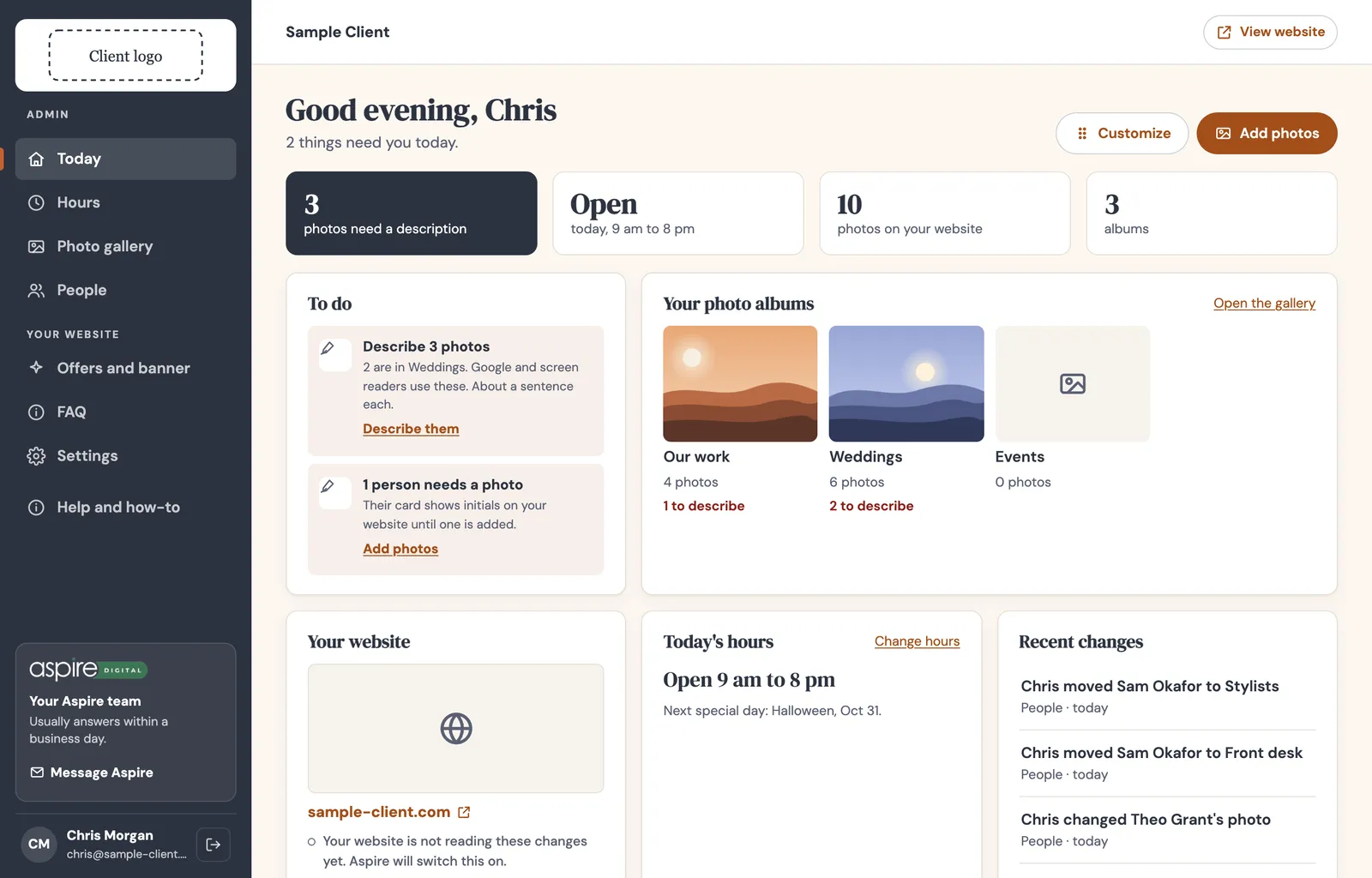
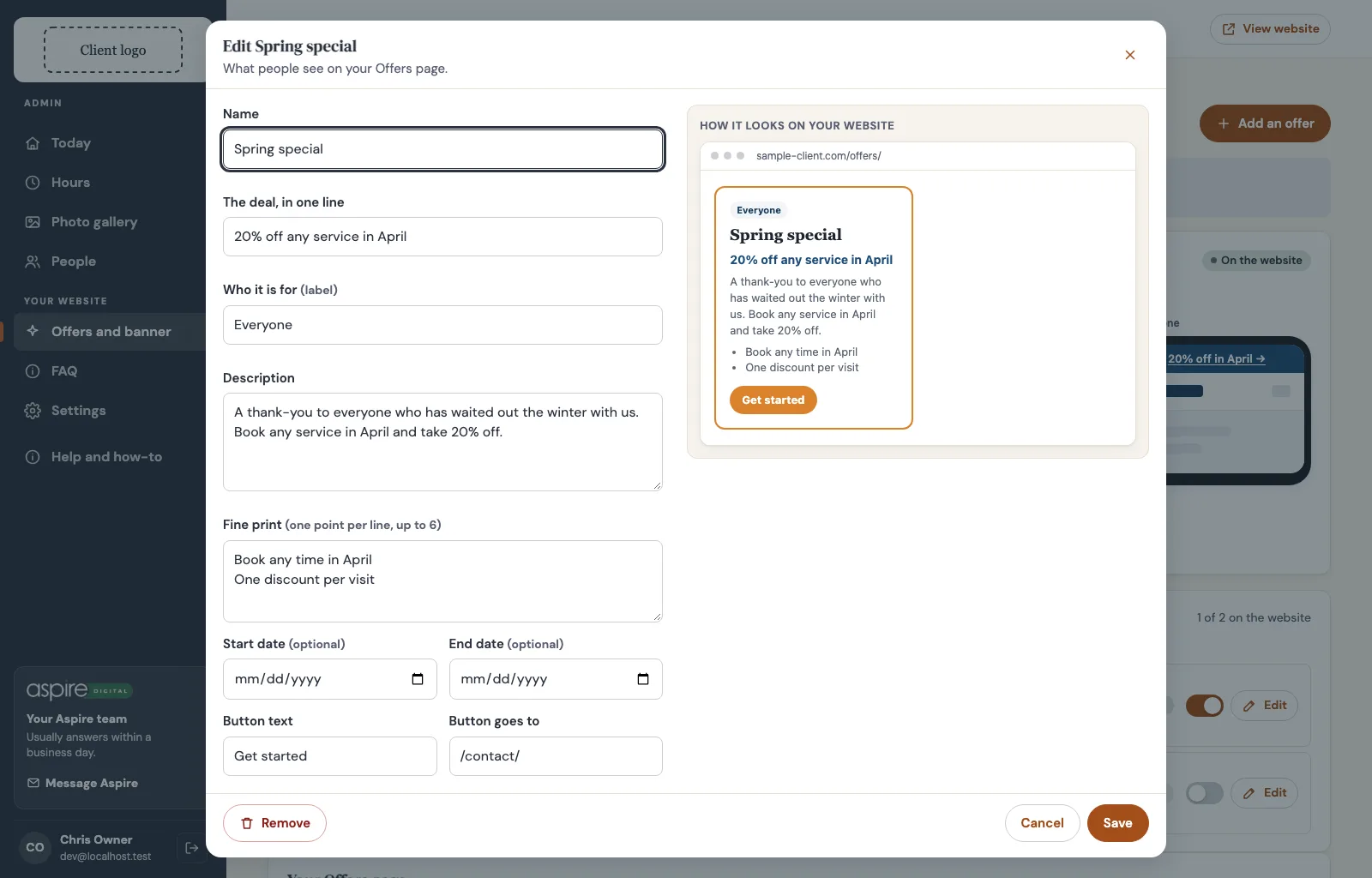
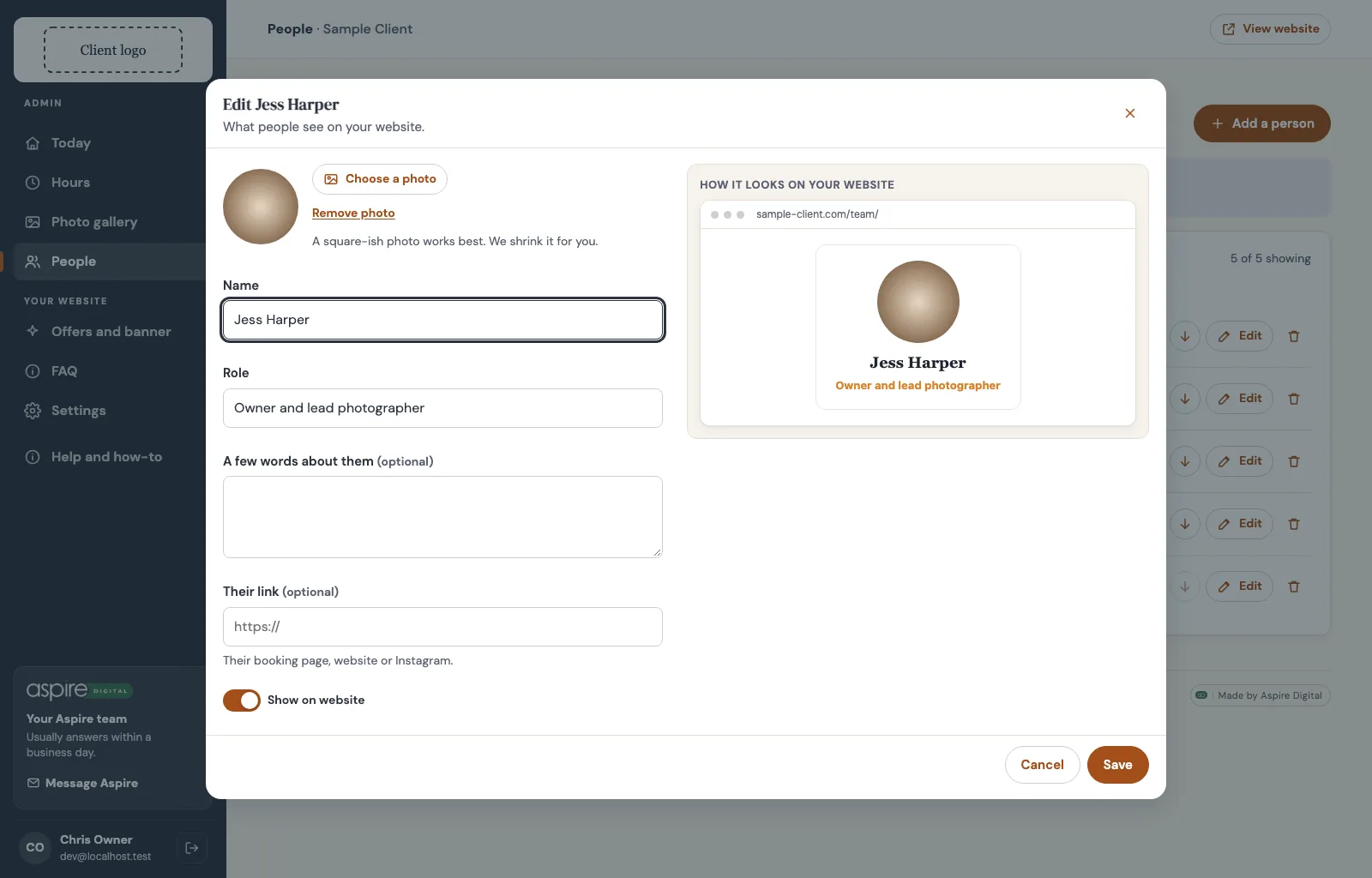
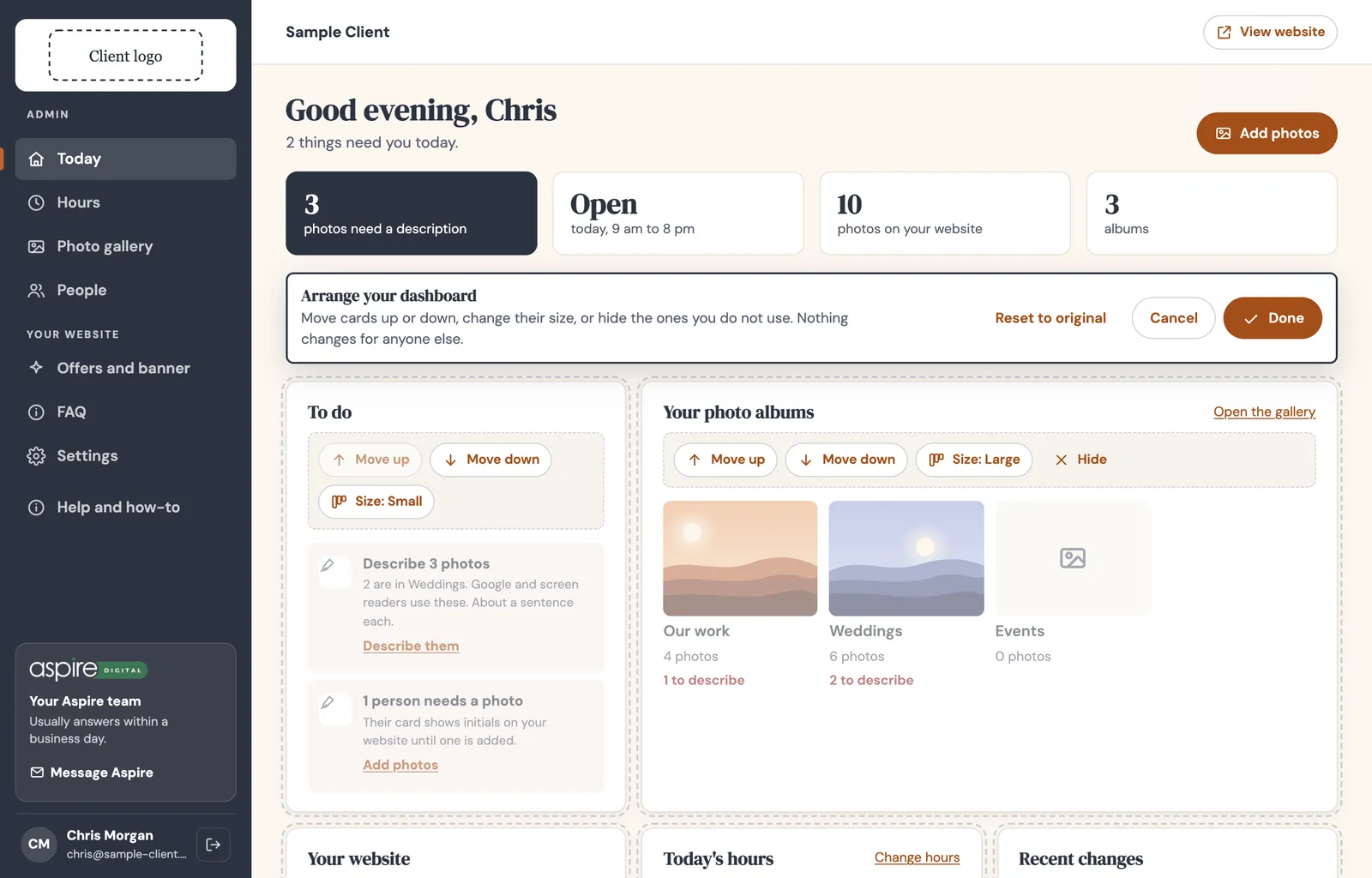
A dark charcoal sidebar, a top bar with View website, a dashboard of cards in four sizes, and work screens that list items. Adding or changing anything opens a modal with a live preview of the website beside the form. Topher picked this direction on September 24 from three options. The full rules are in the template repo’s STANDARD.md.
What a business can manage itself
Each module comes with its screen, a dashboard card, Help answers, and a feed the website reads.
| Module | What the owner does | Website feed |
|---|---|---|
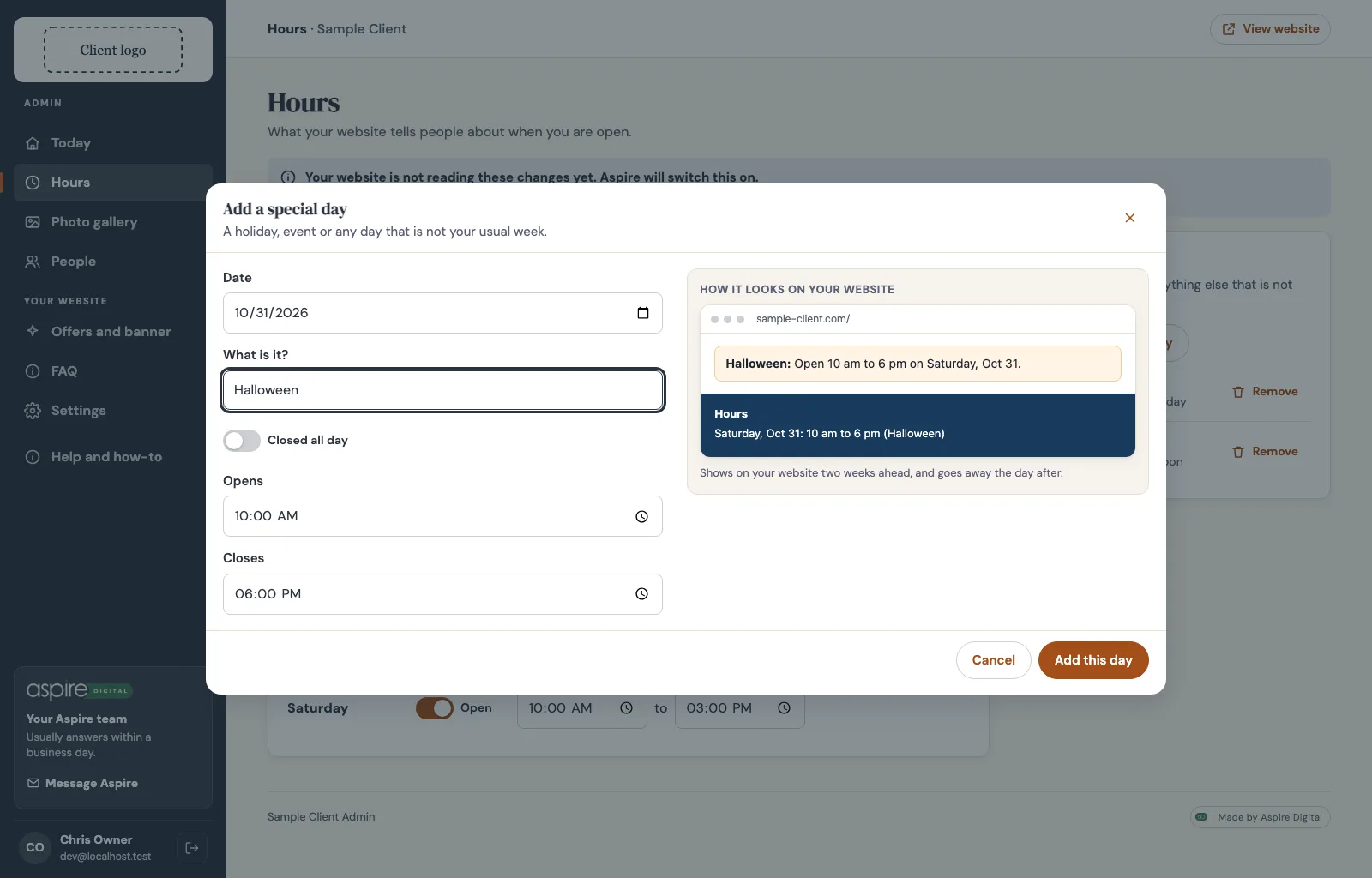
| Hours | Change the usual week, add holidays and special days. Past days drop off on their own. | hours.json |
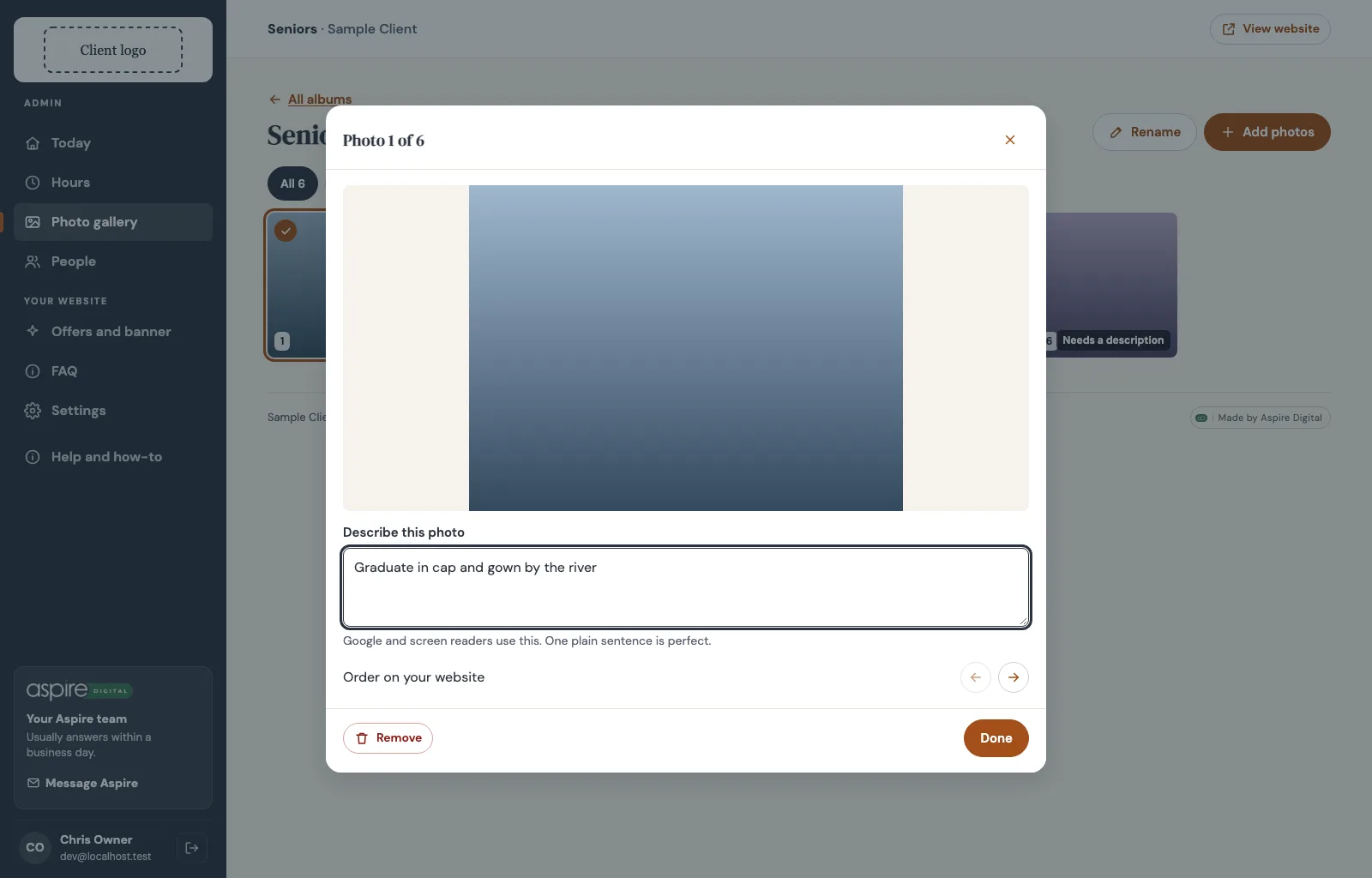
| Photo gallery | Albums, add many photos from a phone, describe each one, change the order, remove with Undo. Moving a photo to another album is not built yet. | gallery.json |
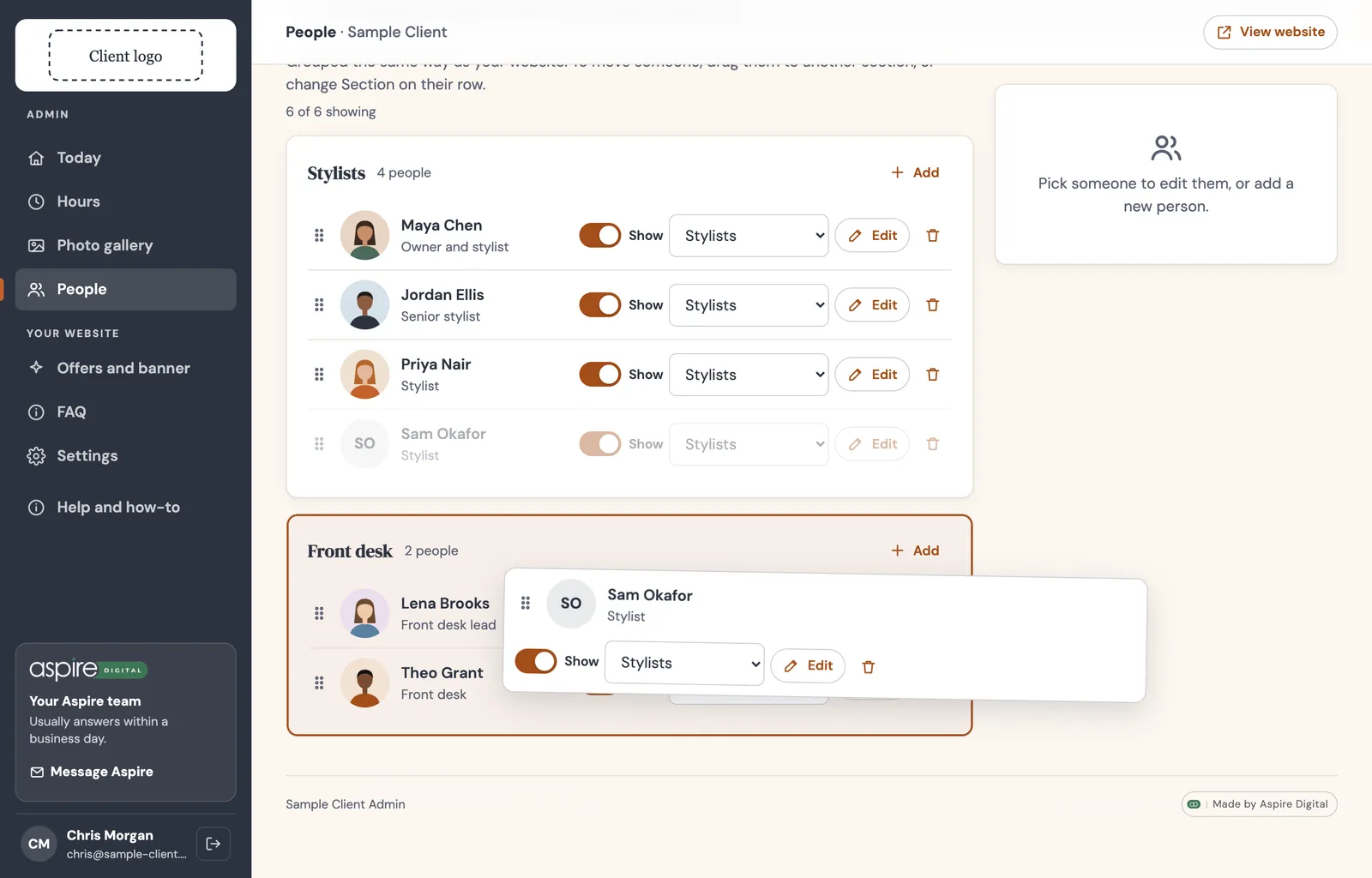
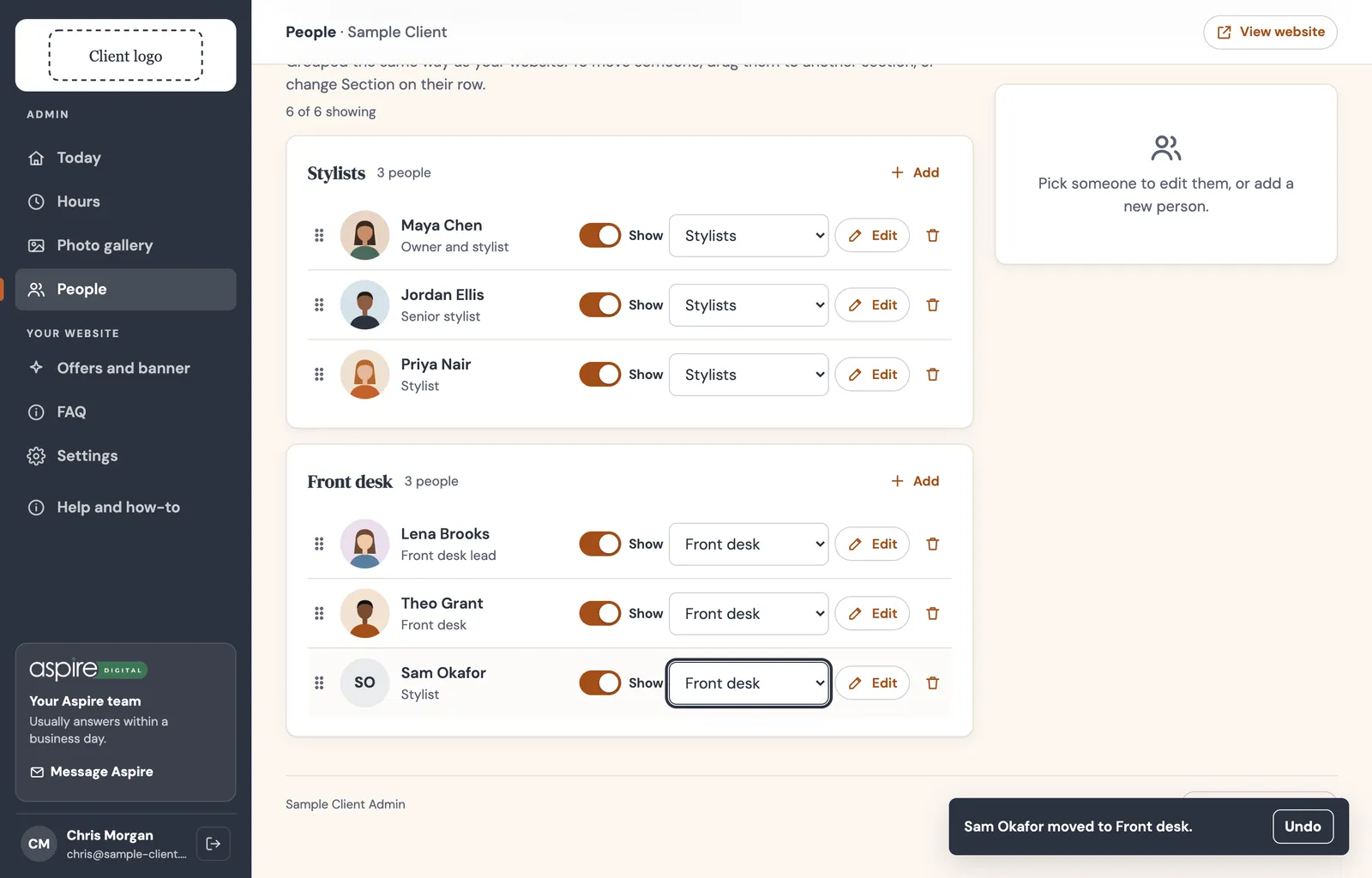
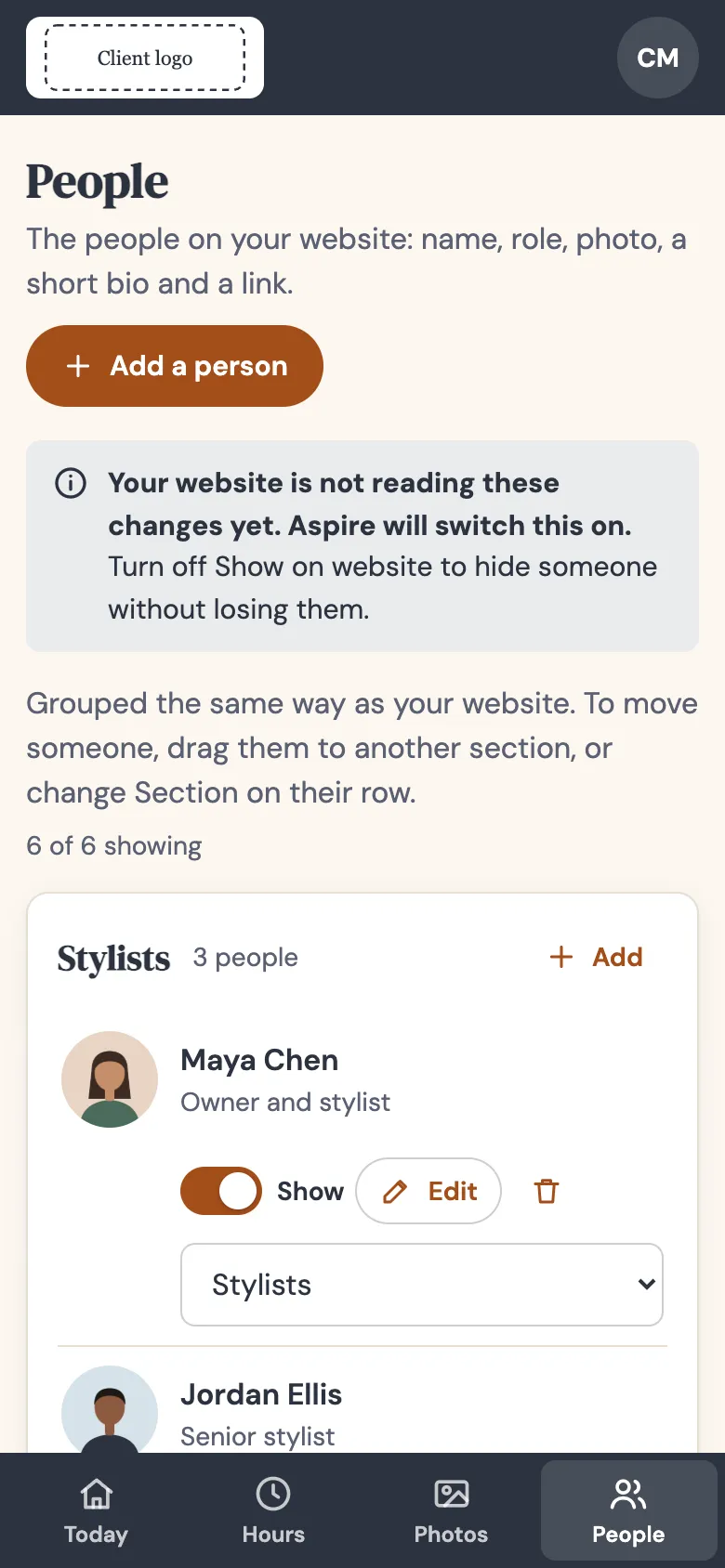
| People | Name, role, photo, short bio and a link; show or hide; reorder. Renamed per client (“Artists”, “Stylists”). Optional sections, like Stylists and Front desk: drag someone to another section, or use the Section menu on their row, with Undo. | people.json |
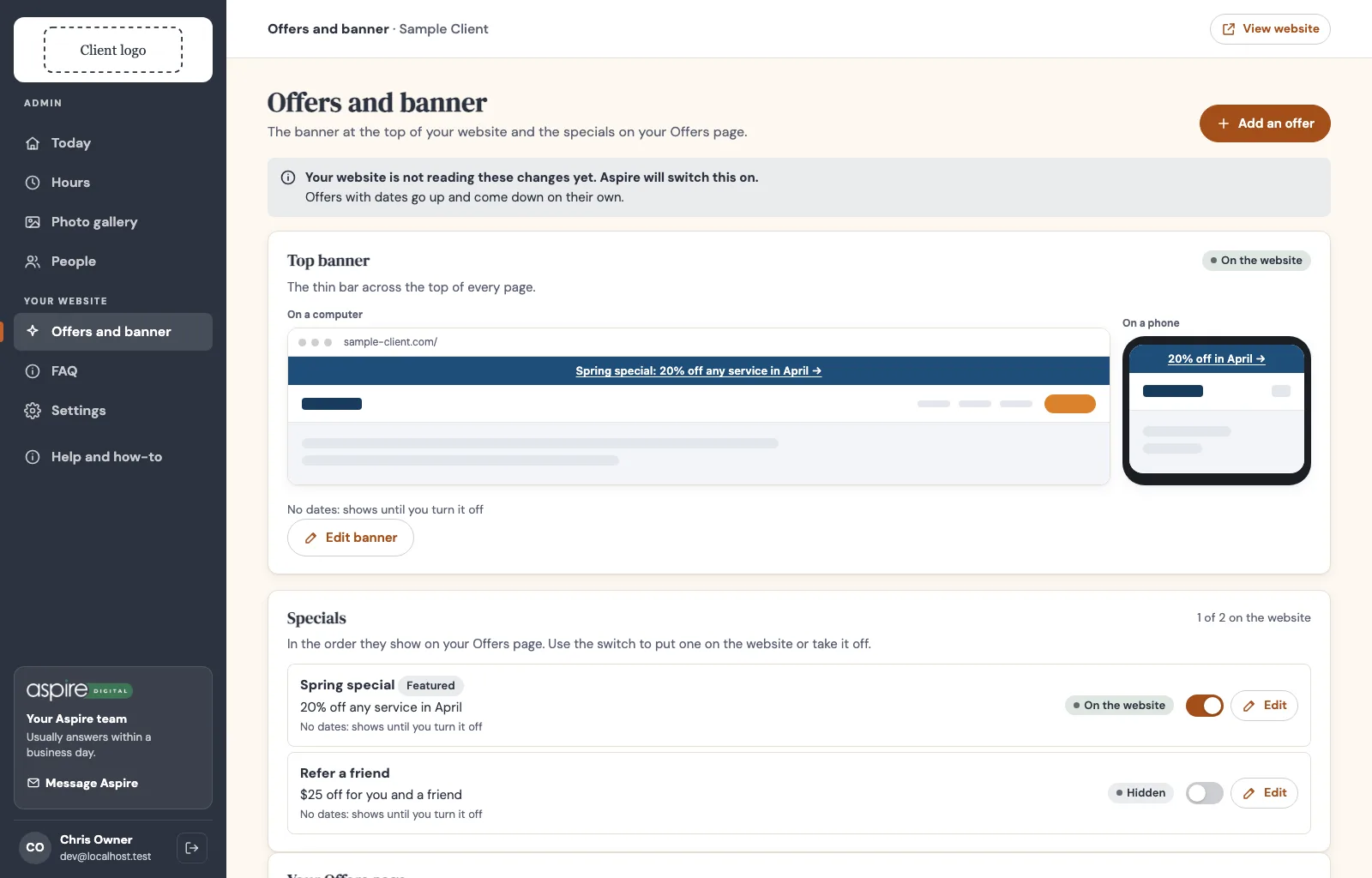
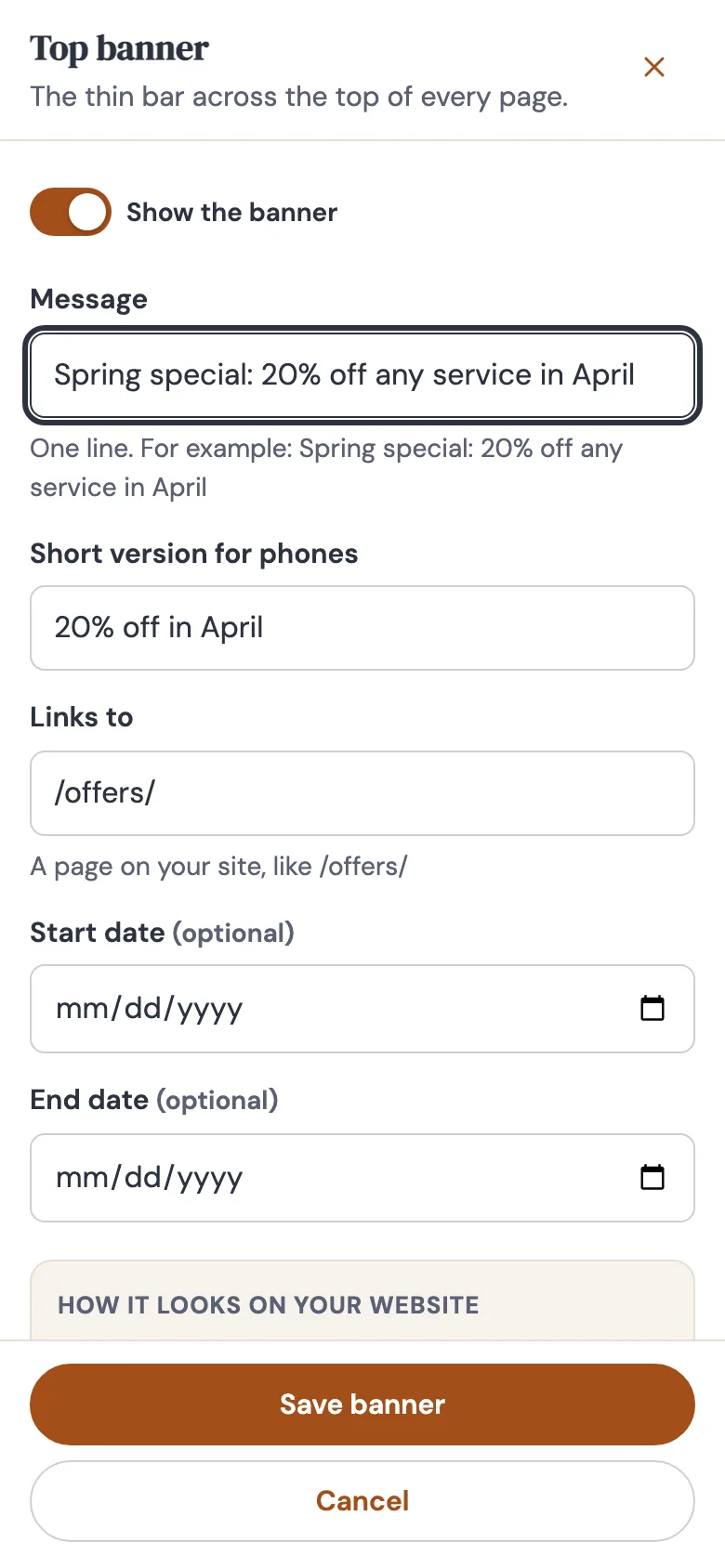
| Offers and banner | The thin banner across the top of every page (with a short version for phones) and the specials on an Offers page. Each has an on/off switch and optional start and end dates, so a deal goes up and comes down on its own. Add and edit in a pop-up. | offers.json |
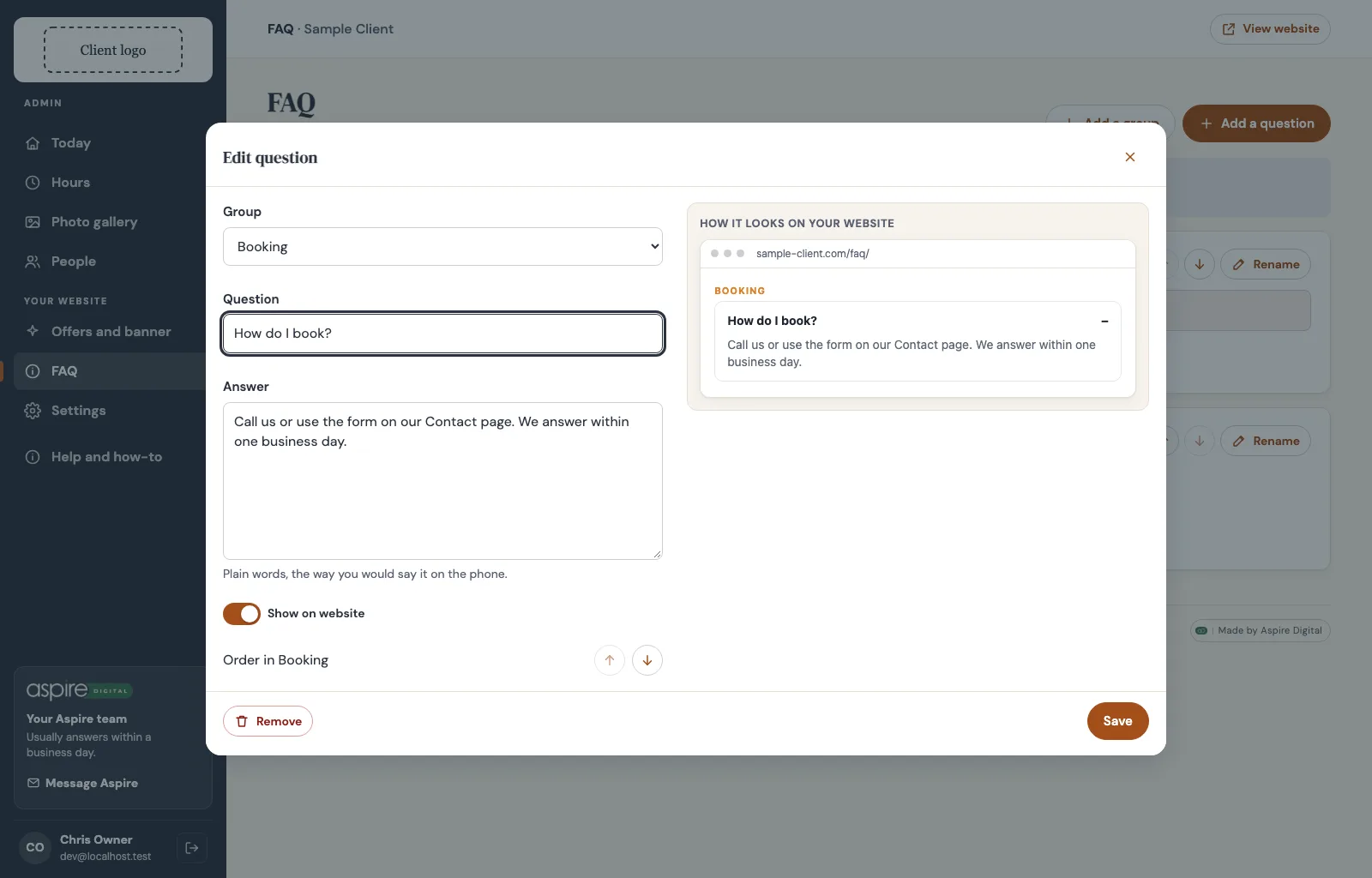
| FAQ | Questions and answers in groups. Add, edit, hide, reorder, move between groups. | faq.json |
| Settings | Account, who can sign in, what the portal does. Always on. | none |
| Hiring, paperwork, team page | Applicant board with private HR notes, phone-friendly new-hire forms with e-signature, Meet the Team page. Modern Maid’s portal only, for now. | team.json |
| Leagues Not built | League nights, start times, season dates and openings, with plus and minus buttons for openings. For Delaware Lanes. | leagues.json |
| Menu Not built | Food and drink (or any price list) in sections, with prices and show or hide. Built from the FAQ module. For Delaware Lanes. | menu.json |
Which modules for which client
Only what a business uses is turned on. Nothing else shows up in their menu.
| Client | Modules | Notes |
|---|---|---|
| Modern Maid | Hiring, new-hire paperwork, team page, offers, hours | The first portal. FAQ is built there but turned off. Its team page, shown in parts, is where people sections came from. |
| PhotosbyB4 | Photo gallery | Albums such as portfolio, seniors and families. |
| Patina Salon | People only, with sections | Their stylists and the other artists in the building, called “Artists” in their portal. |
| Delaware Lanes | Hours, leagues, menu | Hours is ready. Leagues and menu are the next two modules to build, so the Leagues page and the food menu stop going stale. |
Aspire’s look, their logo
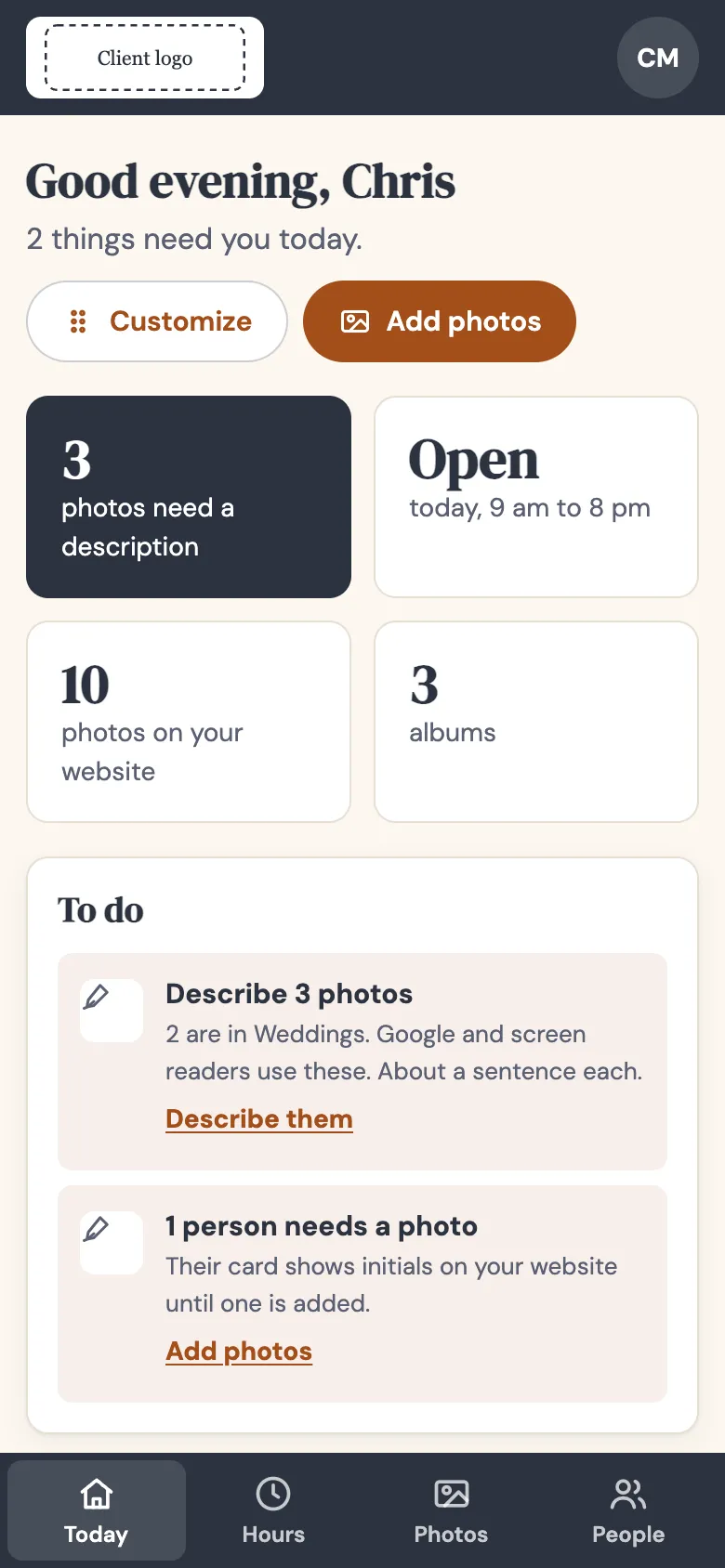
Every portal wears Aspire’s look, exactly as in these screenshots. The client shows up as their logo and their name.
- Aspire’s look in every portal: charcoal sidebar, cream pages, terracotta buttons, DM Serif Display headings and DM Sans text, from one theme file that no client changes. Every color pair is checked for readable contrast.
- The client: their logo on the white tile at the top of the menu, and their business name. Their own colors and fonts stay on their website.
- Every add, edit or change opens in a modal, never a side panel. On a phone the modal fills the whole screen with nothing showing behind it, and the page underneath cannot scroll. Escape or the X closes it and puts you back where you were.
- A live preview of the website sits beside the form: whatever you type shows the way the client’s website will show it (the banner on a computer and a phone, an offer card, a team card, an FAQ answer, a special-day notice, or the client’s own pieces like Delaware Lanes’ league rows and menu cards). Switch something off and the preview says it is not on the website.
- Modals grow with the screen and shrink with it: one column on tablets, the form and preview side by side from laptop size, wider again on large and extra-large monitors.
- Full screen: pages use the whole width of the window at every size. Only the margins grow as the screen does (phone, tablet, laptop, large desktop), and long paragraphs keep a comfortable line length.
- Aspire, identical everywhere: a “Your Aspire team” card in the sidebar with a Message Aspire link, and the “Made by Aspire Digital” credit at the foot of each page. Help and how-to sits in the menu.
- Each person can arrange their own dashboard with Customize: move cards up or down, change their size, hide what they do not use, or reset. All with buttons, never dragging only, so it works for everyone. Nobody else’s dashboard changes.
- Honest about the website: until a client’s website actually reads the portal, every page says so plainly. Once it does, the portal says changes show up within a minute. One setting,
brand.site.connected, switches the wording.
How the website stays fast
Portal changes reach the website within a minute, without making visitors wait and without breaking the site if the portal is down.
The client’s website is still a finished, saved page. A small helper in the template, the site-kit, runs on Cloudflare in front of it and puts the latest portal content into that page on the way out: the banner, the hours in the footer, a special-day line, the people, the FAQ.
- Saved copy first. The website keeps a copy of each portal feed. For the first minute it uses that copy as is. After that it still serves the copy right away and fetches a fresh one in the background, for up to a day. Only the very first visit in a Cloudflare location waits for the portal, with a 4 second limit.
- Safe fallback. If anything goes wrong, visitors get the saved page exactly as it was built. That is why every page must be complete on its own.
- No JavaScript in the browser. Everything happens before the page reaches the visitor, and the markup keeps the same shape, so nothing jumps around as it loads.
- One address per environment. Each website environment is told which portal to read. With no address set, it reads nothing, so production stays a plain saved site until its portal exists.
Measured on Modern Maid’s studio site
A normal visit costs about 30 to 80 milliseconds more than the plain saved page. Before we served the saved copy first, a visit now and then took 300 to 400 milliseconds while the copy was refreshed; serving the saved copy first removed those.
Three portals, three websites
The portal’s address is “admin.” in front of the website’s address, and each portal feeds the website with the same name.
| Environment | Website | Portal | What it is for |
|---|---|---|---|
| Studio | <slug>.studio.madebyaspire.com | admin.<slug>.studio.madebyaspire.com | Aspire’s sandbox. We build and test here. |
| Launch | <slug>.launch.madebyaspire.com | admin.<slug>.launch.madebyaspire.com | The client’s rehearsal, with its own data. They practice here before go-live. |
| Production | <client-domain> | admin.<client-domain> | The real thing. |
At go-live
Copy the launch portal’s content into the production portal once, so the owner keeps everything they set up while rehearsing. After that, each environment keeps its own data.
What we copy, what we avoid
We looked at the admin tools small businesses already know and at usability research, then kept what fits owners who are not technical.
We copy
Shopify’s home that lists what needs you, and its save bar for multi-field edits. Webflow Editor’s rule that owners edit content, never layout. Payload CMS’s dashboard of module cards with a default layout, per-person arranging and reset. Directus’s modules that register their own menu entry and permission check. Gusto and Homebase’s “waiting on you” queue and phone-friendly new-hire paperwork. GOV.UK’s plain words and one job per page.
We avoid
WordPress-style menu sprawl (only this client’s modules are on). Dashboards of vanity charts. “Are you sure?” on everything (Undo instead). Free-form drag-and-drop grids: research shows people rarely customize, and drag-only fails WCAG 2.2, so every drag has a button or menu that does the same. Jargon like “publish”, “slug” or “alt text”. Draft and publish steps for simple content, since changes are live in a minute and every change is logged.
Sources: Shopify Polaris, contextual save bar · Payload dashboard widgets · Nielsen Norman Group on customization · WCAG 2.2 dragging movements · Webflow content editors · Directus modules · Gusto onboarding checklists · GOV.UK task list · Undo over confirmation
When a module counts as done
Every module ships with the same pieces. A build agent works through this list before anyone sees it.
- A menu entry, at least one dashboard card with real numbers and a to-do when something needs the owner, and at least two Help answers written the way the owner would ask.
- Anyone in the business can look; only an owner or admin can change. Someone who can only look is told so on the page.
- Every change writes one plain sentence to Recent changes. Anything reversible gets Undo instead of a warning.
- A feed for the website with only what visitors see, and a site-kit recipe so the website can show it.
- Plain words, no em dashes, never the CRM’s brand name. Works at phone width with no sideways scroll, with 44 pixel tap targets.
- Tests for what it does and what it refuses, plus the automatic permission sweep over every route. The accessibility scan is clean on every page.
For agents
Read STANDARD.md in madebyaspire/aspire-admin-template before building. npm run new:module scaffolds a module with every piece above. Kit changes happen in the template first, never in one client’s copy.
Setting up a new portal
From template to a studio link Jaime can review.
- Agree what the business needs to manage and pick modules. Anything new becomes a new module.
- Create
madebyaspire/<slug>-portalfrom the template and runnpm run init:clientwith the slug, business name and domain. - Theme it: their palette and fonts in the theme file, their logo and favicons.
- Turn on modules, use their words (People can become “Artists”), set options such as people sections, the default dashboard and the one main button.
- Create the database and photo storage, and ask Aria to register the portal on Aspire Identity with the owner’s email.
- Connect their website with the site-kit, then switch the portal’s wording to “within a minute”.
- Run the tests, type checks and build guard, click through every page on desktop and phone, deploy to studio, share the link.
- Write a one-page how-to for the owner.
Where things stand today
| Item | State |
|---|---|
| Template repo madebyaspire/aspire-admin-template | Standard 1.5, Studio design, Aspire look, full width, every edit in a modal with a live website preview. Hours, gallery, people with sections, offers, FAQ, settings and the site-kit. 72 tests pass. |
| Modern Maid | Live on the studio and launch portals (admin.modern-maid.studio.madebyaspire.com, admin.modern-maid.launch.madebyaspire.com), each feeding its website. Production portal comes at go-live. |
| PhotosbyB4 | Gallery portal preview. |
| Patina Salon | Ready to start from the template: people with sections. |
| Delaware Lanes | Hours ready. Leagues and menu described in the standard, not built yet. |
| Known gaps | Moving a photo to another album. Finer permissions (an “editor” who can change content but not settings) need a new permission on Aspire Identity, which is Aria’s lane. |
| Playbook | Client portals standard on the playbook. |